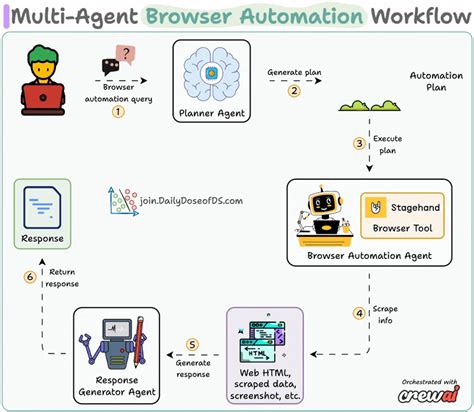
AI agents that can see your screen and take actions are moving from demos to production. Computer use — the ability for a model to navigate a real browser, fill forms, read pages, and click through workflows — is becoming a real primitive. Here's what builders need to understand before hooking it into their products.
What computer use actually means
Computer use refers to AI models that control a computer the way a human would: moving a cursor, typing text, reading screen content, and executing multi-step workflows. Instead of calling an API, the agent sees a screenshot, decides on an action, and the environment executes it.
Anthropic was among the first to ship this with their computer use beta. Since then, frameworks like Browserbase's browser-use, Vimah's offering, and open-source projects have brought similar capabilities to developers. The model doesn't just read the DOM — it reads pixels, which means it works with any UI even without accessibility hooks.
Why it matters for product teams
The traditional AI integration path is: API → structured output → action. Computer use changes the path to: goal → agent observes environment → agent takes action. This closes the gap for use cases where no API exists, the API is too limited, or the interface is the product.
Practical applications:
- Automated data entry across legacy web portals
- End-to-end testing that exercises the actual UI
- Research agents that pull data from sites without APIs
- Form completion and document filing workflows
The reliability problem
Screen-based agents are significantly less reliable than API-based agents. Screenshot quality, UI element localization, and action success detection all introduce noise. A click that works in 95% of cases fails silently in the other 5%, and the agent may not know it failed.
Teams shipping computer use in production typically add:
- Confirmation steps: agent verifies state after each action
- Fallback paths: retry with different action if the first fails
- Human-in-the-loop gates: human approves before irreversible actions
- Session recording: full video log so humans can audit what happened
Security and permission boundaries
When an agent controls a browser on behalf of a user, it inherits the user's session and permissions. This is powerful but risky. Credential exposure, unintended purchases, data deletion, and form submissions to wrong systems are all possible failure modes.
Best practices:
- Use dedicated browser sessions with minimal permissions
- Never run computer use agents on the same profile as daily browsing
- Log every action with timestamp and screenshot
- Require explicit user consent before each session starts
- Consider sandboxed environments (VMs, containers) for untrusted workflows
Open source and the browser-use ecosystem
The browser-use library on GitHub has become a reference implementation for connecting LLMs to browser automation. It uses a multi-model pipeline: one model identifies UI elements from screenshots, another decides actions, and a third verifies results. Playwright or Puppeteer drive the actual browser.
For developers wanting to experiment:
from browser_use import Agent
from langchain_openai import ChatOpenAI
agent = Agent(task="Find flights from NYC to Tokyo next Friday",
              llm=ChatOpenAI(model="gpt-4o"),
              browser_engine="playwright")
await agent.run()
The agent outputs a series of actions (click X at Y, type "NYC" in field Z) that the browser engine executes.
What this means for the roadmap
Computer use is not a replacement for API-based automation. It's a complementary path for the long tail of use cases where no API exists. The teams winning with computer use are those that treat it as a fall-back layer — use APIs where available, fall back to computer use where necessary, and build observability around both.
The next wave of AI product features will include agents that can operate existing web products without requiring those products to build native AI integrations. That's a meaningful shift for builders.